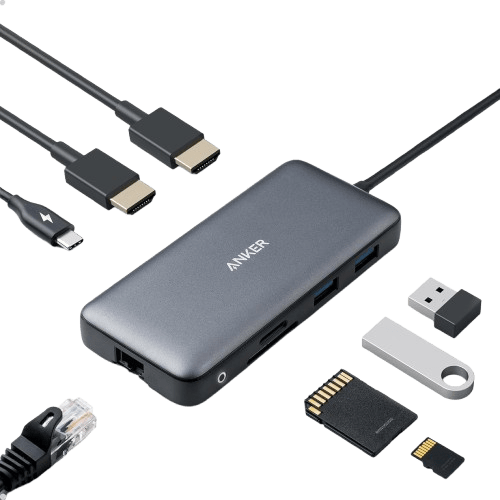
Anker 8-in-1 USB-C Docking Station | Dual 4K HDMI, 85W PD
Anker's 8-in-1 USB-C docking station expands your laptop's connectivity with dual 4K HDMI, 1Gbps Ethernet, USB-A ports, and SD/TF card readers, all while delivering up to 85W pass-through charging.
Specifications
General
| Brand | Anker |
|---|---|
| Model Name | PowerExpand 8-in-1 USB-C PD Media Hub |
| Category | Computer Accessories |
| Subcategory | Docking Stations |
Ports & Interfaces
| USB-C Input | 1 (for host connection) |
|---|---|
| USB-C PD-IN Port | 1 (for charging) |
| USB-A Data Ports | 2 |
| HDMI Ports | 2 |
| Ethernet Port | 1 |
| Card Reader | MicroSD, SD |
Performance
| Ethernet Speed | 1 Gbps |
|---|---|
| Single Monitor Resolution | 4K@60Hz |
| Dual Monitor Resolution | 4K@30Hz (each) |
| Max Power Delivery Pass-Through | 85W |
Compatibility
| Supported Operating Systems | Windows 10/11, ChromeOS |
|---|---|
| Supported Connections | USB-C, USB4, Thunderbolt |
| macOS Dual Display Mode | Identical (mirrored) |
| Linux Compatibility | Not compatible |
Description
Transform your USB-C laptop into a powerful workstation with the Anker Laptop Docking Station, an 8-in-1 USB-C hub designed for seamless connectivity and enhanced productivity. As an expert reviewer, I've found this device to be a robust solution for expanding the capabilities of modern laptops, especially those with limited ports.
Massive Expansion for Your Workspace
This Anker docking station truly lives up to its "8-in-1" designation, offering an impressive array of ports from a single USB-C connection. You gain:
- Dual HDMI Ports: Connect two external monitors for an expansive desktop.
- Two USB-A Data Ports: Easily connect peripherals like keyboards, mice, or external drives.
- Gigabit Ethernet Port: Enjoy stable, high-speed wired internet, essential for critical tasks.
- USB-C PD-IN Charging Port: Keep your laptop powered up with pass-through charging.
- MicroSD and SD Card Readers: Conveniently transfer photos and files from your cameras or drones.
This comprehensive port selection means you can leave dongles behind and manage all your essential connections through one compact device.
Stunning Dual Monitor Support
For visual professionals and multitaskers, the dual HDMI capability is a game-changer. You can extend or mirror your display to two external monitors simultaneously, each at a crisp 4K@30Hz resolution. If you only need a single external display, the hub supports an even smoother 4K@60Hz output. It's important for macOS users to note that both external monitors will display identical content, which is a common characteristic for many USB-C hubs on this platform.
Efficient Power Delivery
Beyond data and display, the Anker docking station supports USB-C Power Delivery, allowing for high-speed pass-through charging up to 85W. This means you can power your laptop while using the hub, reducing cable clutter. For optimal performance, Anker recommends using a 100W PD wall charger and a USB-C to C cable, neither of which are included with the hub.
Broad Compatibility and Anker Reliability
Compatibility is key, and this hub works seamlessly with a wide range of devices supporting USB-C, USB4, and Thunderbolt connections. It's fully functional with Windows 10 and 11, ChromeOS, and laptops equipped with DP Alt Mode and Power Delivery. While it offers extensive support, users should be aware that it is not compatible with Linux operating systems. Backed by the Anker Advantage, you're joining over 50 million satisfied customers, and the product comes with an 18-month worry-free warranty and friendly customer service, ensuring peace of mind.
Pros & Cons
Pros
- Massive 8-in-1 expansion from a single USB-C port
- Supports dual 4K@30Hz or single 4K@60Hz external monitors
- Provides up to 85W high-speed pass-through charging
- Includes a reliable 1Gbps Ethernet port for stable internet
- Broad compatibility with Windows, ChromeOS, USB-C, USB4, and Thunderbolt devices
Cons
- 100W PD wall charger and USB-C to C cable are not included
- macOS users will experience identical (mirrored) displays on both external monitors
- Not compatible with Linux operating systems
Frequently Asked Questions
No, for macOS, both external monitors connected via HDMI will display identical (mirrored) content, not extended displays.
No, a 100W PD wall charger and a USB-C to C cable are required for pass-through charging up to 85W and are not included.
It is compatible with Windows 10 and 11, and ChromeOS. It is not compatible with Linux.
When connecting a single external monitor, the hub supports a resolution of up to 4K@60Hz.
Yes, it supports USB-C Power Delivery for pass-through charging up to 85W, provided you use a 100W PD wall charger and a USB-C to C cable (not included).
Related Products
You might also like these products